
you can also read this article in Medium -> click here
Tools calling is great, it makes LLMs smarter and really gives us this agentic flavour. We can just write our Java methods, and with one-two very simple annotations, make them available for LLMs to call! I really love this, and I’ve played around with it a lot, but at some point, when I started to think about real-life applications, some questions started to pop up. Let’s look at an example:
Imagine you’re building an E-Commerce platform with a very rich feature set. You’ll probably have core functionality like products, categories, orders, carts, discounts, users, etc. Then, some features like promotions, campaigns, and different types of notifications. You might want to expose tools for sending these notifications, too.
Now, let’s think about building an agent that can help us understand what’s going on in the system. It could handle things like answering simple questions about orders, users, carts, products… maybe check campaign status, clean up some outdated data, or send notifications.
When we break all that down and see how many methods we need to expose as tools for the LLM to work with, we’ll easily end up with hundreds, or even thousands of them.
This can really bloat Claude’s context and become a serious problem, because every single tool definition — name, description, full JSON schema — gets loaded into the context window on every single request. So you end up paying the token cost of all, say, like 500 tools, even when Claude only needs one of them to answer a simple question like “What’s the status of my order?”
Anthropic proposed a very nice solution to this problem: The Tool Search Tool, which uses search to find the tool that’s needed to answer the question and passes only this tool to the model’s context window.
Here’s how it works (I’m just quoting the docs here):
The Tool Search Tool lets Claude dynamically discover tools instead of loading all definitions upfront. You provide all your tool definitions to the API, but mark tools with
defer_loading: trueto make them discoverable on-demand. Deferred tools aren't loaded into Claude's context initially. Claude only sees the Tool Search Tool itself plus any tools withdefer_loading: false(your most critical, frequently-used tools).
Sounds very simple and logical, right? To enable this, we need only three things:
- Add the
advanced-tool-use-2025-11-20Beta header to our requests - Include the Tool Search Tool in our tools list
- Mark our tools with
defer_loading: true
That’s it!
Let me show you how this looks in practice in Java code with a simple LangChain4j example.
Example
We’ll start by creating a simple Java Gradle project in IntelliJ. Go to File > New > Project, choose a name and location, and click on “Create” :
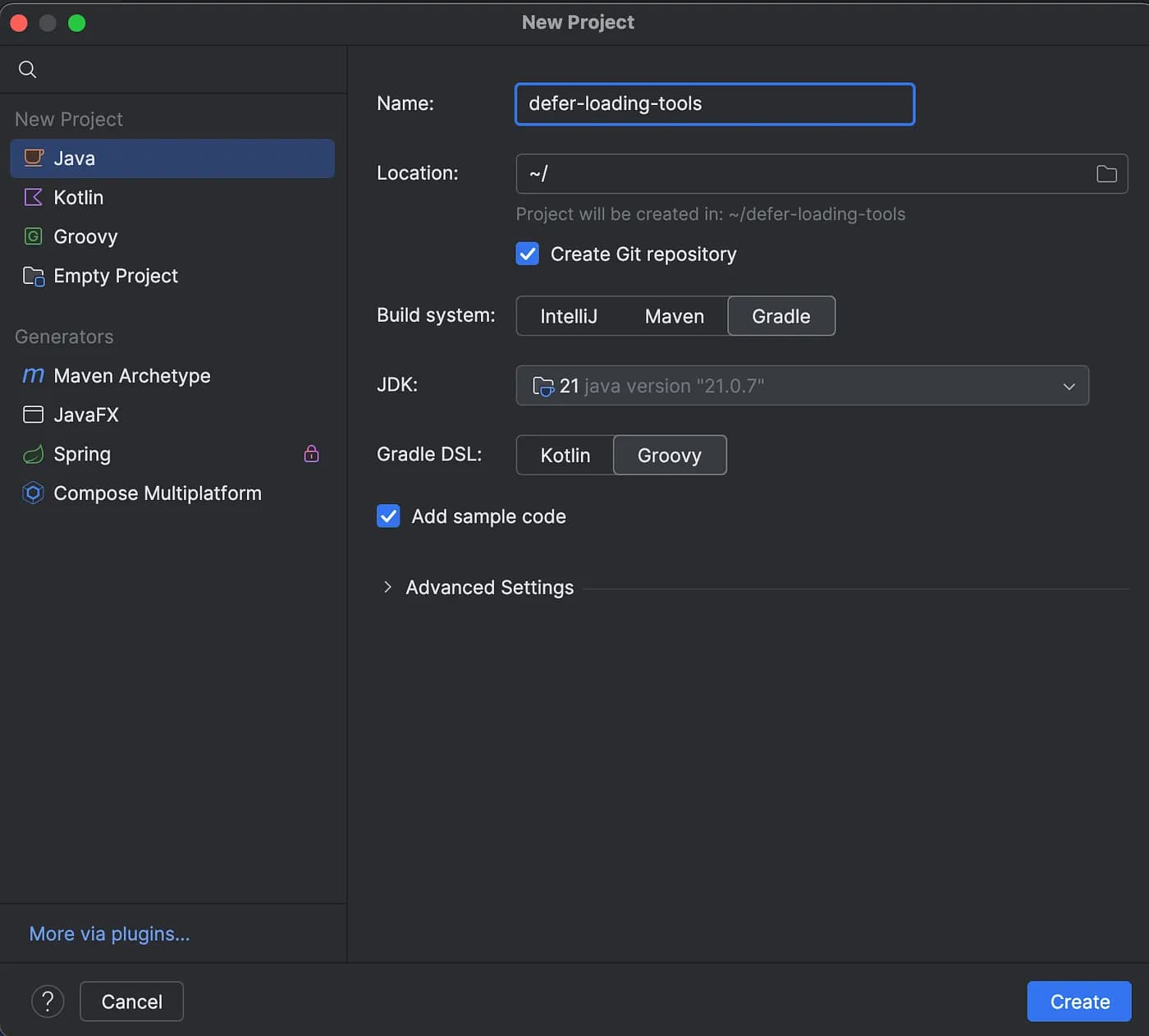
We’ll then add the required Langchain4j dependencies. Go to build.gradle and add:
implementation 'dev.langchain4j:langchain4j:1.12.2'
implementation 'dev.langchain4j:langchain4j-anthropic:1.12.2'
Now we’re ready to start coding. I won’t go into the specifics of Langchain4j here. You can take a look at some of my articles that explain the basics—for example, here, here, and here.
We’ll start by initializing the anthropic chat model we want to use. In this step, we’ll take care of adding the beta header and the Tool Search Tool as part of our tool set. It’s as simple as this:
// Define the server-side search tool that the model can call
AnthropicServerTool toolSearchTool = AnthropicServerTool.builder()
        .type("tool_search_tool_regex_20251119")
        .name("tool_search_tool_regex")
        .build();

AnthropicChatModel model = AnthropicChatModel.builder()
        .apiKey(System.getenv("ANTHROPIC_API_KEY"))
        .modelName("claude-sonnet-4-6")
        // Add the beta header
        .beta("advanced-tool-use-2025-11-20")
        // Register the server-side tool so the model can call it
        .serverTools(toolSearchTool)
        // Enable the use of 'defer_loading' metadata
        .toolMetadataKeysToSend("defer_loading")
        .logRequests(true)
        .logResponses(true)
        .build();
I think the code speaks for itself here. We first define the search tool, which will help Claude to find exactly the tool that’s needed to answer the question, and then pass it to the AnhtropicChatModel builder with .serverTools(toolSearchTool). We also add the beta header through .beta(“advanced-tool-use-2025–11–20”) and then add support for the defer_loading metadata. We’ll add the defer_loading metadata to the annotations when defining our tools — actually, let’s do this right away.
We’ll create a Java class that defines all of our tools and mark them with the metadata defer_loading . I asked ChatGPT to generate a good number of tool methods for me (like 50). The reason for this is that it doesn’t make any sense to use this feature if you have like 10 tools, because it adds a search step before tool invocation. Here is the guide from Anthropic on when to use the Tool Search Tool:
Use it when:
- Tool definitions consuming >10K tokens
- Experiencing tool selection accuracy issues
- Building MCP-powered systems with multiple servers
- 10+ tools available
Less beneficial when:
- Small tool library (<10 tools)
- All tools used frequently in every session
- Tool definitions are compact
So, again, it makes sense to use this feature if we have many tools in order to see a difference in the token usage. Here are a couple of the methods ChatGPT generated for me — they answer questions about orders — very typical scenario in an E-Commerce application:
public class OrderTools {

    private static final String DEFER_LOADING_METADATA = """
    {
      "defer_loading": true
    }
    """;

    @Tool(  value = "Get the estimated delivery date for a shipped order by its order ID",
            metadata = DEFER_LOADING_METADATA)
    public String getDeliveryDate(String orderId) {
        Map<String, String> dates = Map.of(
                "1002", "2026-03-28",
                "1003", "2026-03-20"
        );
        String date = dates.get(orderId);
        return date != null
                ? "Order " + orderId + " estimated delivery: " + date
                : "No delivery date available for order " + orderId;
    }

    @Tool(  value = "Get the list of items in an order by its order ID",
            metadata = DEFER_LOADING_METADATA)
    public String getOrderItems(String orderId) {
        Map<String, String> items = Map.of(
                "1001", "2x Laptop Stand, 1x USB Hub",
                "1002", "3x Mechanical Keyboard",
                "1003", "1x Monitor, 2x HDMI Cable",
                "1004", "1x Webcam"
        );
        String result = items.get(orderId);
        return result != null
                ? "Order " + orderId + " contains: " + result
                : "No items found for order " + orderId;
    }

    @Tool(  value = "Cancel an order by its order ID. Only PENDING orders can be cancelled.",
            metadata = DEFER_LOADING_METADATA)
    public String cancelOrder(String orderId) {
        return "Order " + orderId + " cancellation request submitted. "
                + "Will be processed within 24 hours if the order is still PENDING.";
    }

...

    @Tool(  value = "Get the shipping carrier and tracking number for a shipped or delivered order",
            metadata = DEFER_LOADING_METADATA)
    public String getTrackingInfo(String orderId) {
        Map<String, String> tracking = Map.of(
                "1002", "DHL | Tracking: DHL-9284710293",
                "1003", "FedEx | Tracking: FDX-3847201938"
        );
        String info = tracking.get(orderId);
        return info != null
                ? "Order " + orderId + " tracking: " + info
                : "No tracking info available for order " + orderId;
    }
}
Notice the most important thing here — all of them are annotated with metadata = DEFER_LOADING_METADATA which just adds “defer_loading”: true to the tool’s metadata.
We’ll also need an OrderAssistant interface, in order to create our chat assistant — here we can define our system prompt:
interface OrderAssistant {
    @SystemMessage("You are an order support assistant. Use tool search if needed to find the right tool.")
    Response<AiMessage> chat(String userMessage);
}
And here is how to build our assistant using this interface and our order tools defined in the step before:
OrderAssistant assistant = AiServices.builder(OrderAssistant.class)
        .chatModel(model)
        .tools(new OrderTools())
        .build();
That’s it! We can now ask our OrderAssistant some questions. Here’s how to do it:
Response<AiMessage> response = assistant.chat("What is the status of order 1002?");
System.out.println("\nResponse: " + response.content().text());
Note: To run this, you must have an Anthropic API key set as the ANTHROPIC_API_KEY environment variable. At the time of writing, an API key is required even for testing, which will mean some minimal usage costs. Please get in touch with me if you find a way around this — it’d be nice to be able to test this without having to spend money on it.
If you managed to follow along and run your program, you’ll get the following answer:
Response: Here is the status of **Order 1002**:

- **Carrier:** DHL
- **Tracking Number:** DHL-9284710293
- **Estimated Delivery Date:** March 28, 2026

You can use the tracking number **DHL-9284710293** on the DHL website to get real-time updates on your shipment. Let me know if there's anything else I can help you with!
Very nice, right? Claude managed to successfully use even 2 of our tools getTrackingInfo and getDeliveryDate !
Now let’s look into this in a bit more detail to understand what really happened here. Notice we set the following on our chat model:
.logRequests(true)
.logResponses(true)
which enables the logging of the actual requests and responses that are being sent to and received from the model.
Let’s look at part of the first request sent to Claude under the hood for us:
- method: POST
- url: https://api.anthropic.com/v1/messages
- headers: [x-api-key: sk-an...AA], [anthropic-version: 2023-06-01], [anthropic-beta: advanced-tool-use-2025-11-20], [Content-Type: application/json]
- body: {
  "model" : "claude-sonnet-4-6",
  "messages" : [ {
    "role" : "user",
    "content" : [ {
      "type" : "text",
      "text" : "What is the status of order 1002?"
    } ]
  } ],
  "system" : [ {
    "type" : "text",
    "text" : "You are an order support assistant. Use tool search if needed to find the right tool."
  } ],
  "max_tokens" : 1024,
  "stream" : false,
  "tools" : [ {
    "name" : "tool_search_tool_regex",
    "type" : "tool_search_tool_regex_20251119"
  }, {
    "name" : "getDeliveryDate",
    "description" : "Get the estimated delivery date for a shipped order by its order ID",
    "input_schema" : {
      "type" : "object",
      "properties" : {
        "arg0" : {
          "type" : "string"
        }
      },
      "required" : [ "arg0" ]
    },
    "defer_loading" : true
  }, {
    "name" : "getTrackingInfo",
    "description" : "Get the shipping carrier and tracking number for a shipped or delivered order",
    "input_schema" : {
      "type" : "object",
      "properties" : {
        "arg0" : {
          "type" : "string"
        }
      },
      "required" : [ "arg0" ]
    },
    "defer_loading" : true
...
You must immediately notice:
- the beta header
- the automatically added search tool (
tool_search_tool_regex) - and also the metadata added to every single one of our tools —
"defer_loading" : true
This is great — it confirms that all we tried to do is actually working!
Now, let’s look at the first response from the anthropic server:
{
  "model": "claude-sonnet-4-6",
  "id": "msg_01MY6n8vqeBhe9Podr8skotG",
  "type": "message",
  "role": "assistant",
  "content": [
    { "type": "text", "text": "Let me search for the right tool to check the order status." },
    { "type": "server_tool_use", "id": "srvtoolu_012Q973f4xFkjhWP7JUVqnSe", "name": "tool_search_tool_regex", "input": { "pattern": "order status" }, "caller": { "type": "direct" } },
    {
      "type": "tool_search_tool_result",
      "tool_use_id": "srvtoolu_012Q973f4xFkjhWP7JUVqnSe",
      "content": { "type": "tool_search_tool_search_result", "tool_references": [{ "type": "tool_reference", "tool_name": "sendOrderUpdateEmail" }] }
    },
    {
      "type": "server_tool_use",
      "id": "srvtoolu_01JgBvfCCNWFMcn2VyD1Gw7V",
      "name": "tool_search_tool_regex",
      "input": { "pattern": "get order|fetch order|order details|order info|order lookup" },
      "caller": { "type": "direct" }
    },
    { "type": "tool_search_tool_result", "tool_use_id": "srvtoolu_01JgBvfCCNWFMcn2VyD1Gw7V", "content": { "type": "tool_search_tool_search_result", "tool_references": [] } },
    { "type": "server_tool_use", "id": "srvtoolu_01BzvFdHvuBF4fKhuDrWcVar", "name": "tool_search_tool_regex", "input": { "pattern": "order" }, "caller": { "type": "direct" } },
    {
      "type": "tool_search_tool_result",
      "tool_use_id": "srvtoolu_01BzvFdHvuBF4fKhuDrWcVar",
      "content": {
        "type": "tool_search_tool_search_result",
        "tool_references": [
          { "type": "tool_reference", "tool_name": "getDeliveryDate" },
          { "type": "tool_reference", "tool_name": "getTrackingInfo" },
          { "type": "tool_reference", "tool_name": "requestReturnLabel" },
          { "type": "tool_reference", "tool_name": "reportLostShipment" },
          { "type": "tool_reference", "tool_name": "getPackageDimensions" }
        ]
      }
    },
    { "type": "text", "text": "Let me retrieve the available order information by fetching the tracking info and estimated delivery date for order 1002 simultaneously." },
    { "type": "tool_use", "id": "toolu_017BYJW9PM56VkMeu9Zi7j8B", "name": "getTrackingInfo", "input": { "arg0": "1002" }, "caller": { "type": "direct" } },
    { "type": "tool_use", "id": "toolu_01MApNDpGGySWDuyvBux65Ex", "name": "getDeliveryDate", "input": { "arg0": "1002" }, "caller": { "type": "direct" } }
  ],
  "stop_reason": "tool_use",
  "stop_sequence": null,
  "stop_details": null,
  "usage": {
    "input_tokens": 4045,
    "cache_creation_input_tokens": 0,
    "cache_read_input_tokens": 0,
    "cache_creation": { "ephemeral_5m_input_tokens": 0, "ephemeral_1h_input_tokens": 0 },
    "output_tokens": 322,
    "service_tier": "standard",
    "inference_geo": "global",
    "server_tool_use": { "web_search_requests": 0, "web_fetch_requests": 0 }
  }
}
This is where the magic happens. If you look closely, you’ll see the server first tries to find the right tools to answer the question. It first searches for "order status" and finds only the tool sendOrderUpdateEmail . It then searches the following pattern — "get order|fetch order|order details|order info|order lookup" and doesn’t find anything. Then, it searches for "order" and gets the following:
"content": {
    "type": "tool_search_tool_search_result",
    "tool_references": [
      { "type": "tool_reference", "tool_name": "getDeliveryDate" },
      { "type": "tool_reference", "tool_name": "getTrackingInfo" },
      { "type": "tool_reference", "tool_name": "requestReturnLabel" },
      { "type": "tool_reference", "tool_name": "reportLostShipment" },
      { "type": "tool_reference", "tool_name": "getPackageDimensions" }
    ]
  }
Then it instructs the tool use of the getTrackingInfo and getDeliveryDate tools:
{ "type": "text", "text": "Let me retrieve the available order information by fetching the tracking info and estimated delivery date for order 1002 simultaneously." },
{ "type": "tool_use", "id": "toolu_017BYJW9PM56VkMeu9Zi7j8B", "name": "getTrackingInfo", "input": { "arg0": "1002" }, "caller": { "type": "direct" } },
{ "type": "tool_use", "id": "toolu_01MApNDpGGySWDuyvBux65Ex", "name": "getDeliveryDate", "input": { "arg0": "1002" }, "caller": { "type": "direct" } }
Claude starts with absolutely no tools loaded in its context. When it needs something, it sends a search query to the anthropic server. The server searches through all the available tools and returns only the relevant matches, which Claude then uses to complete the task. Let’s recap our analysis of Claude’s response here, real quick:
- Claude asks the server to find tools matching
"order status"-> server returns 1 tool - Claude asks the server to find tools matching
"get order|fetch order|order details|order info|order lookup"-> server returns 0 tools - Claude asks the server to find tools matching
"order"-> server returns 5 tools - Only then does Claude request us to call
getTrackingInfoandgetDeliveryDate
This happens instead of Claude loading all 50+ tools into its context to answer the question.
After this, it’s just normal tools calling workflow — we get the response, call the needed tools, and return the results — Claude then uses them to generate the answer for us.
Conclusion
The Tool Search Tool from Anthropic is a really great feature that can save us a lot of tokens. Most examples show 85% reduction in token usage while maintaining access to your full tool library! They added this in November 2025, as part of their Advance Tool Use beta, alongside Programmatic Tool Calling and Tool Use Examples. I’d like to discuss those too in a future article.
Thanks for reading!